Inline Lint Waivers
Lint waivers can be extracted from user comments containing a specific pragma.
 code line 1
 code line 2
 // @DVT_LINTER_WAIVER_START "#NAME#" "#DESCRIPTION#" #STATUS# #CHECKS#
 code line 4
 ...
 code line 7
 // @DVT_LINTER_WAIVER_END "#NAME#"
 code line 8
 code line 10 // @DVT_LINTER_WAIVER "#NAME#" "#DESCRIPTION#" #STATUS# #CHECKS#
 code line 11
 code line 12 /* @DVT_LINTER_WAIVER "#NAME#" "#DESCRIPTION#" #STATUS# #CHECKS# */ // inline comment
 code line 13 /* @DVT_LINTER_WAIVER "#NAME#" "#DESCRIPTION#" #STATUS# #CHECKS# */ /* @DVT_LINTER_WAIVER "#NAME#" "#DESCRIPTION#" #STATUS# #CHECKS# */ // inline comment
Parameters:
#NAME#
Must be an unique id of a waiver
It is optional; if not defined, a default name containing file and line is used
#DESCRIPTION#
Used in GUI as a description box for the waiver
It is optional; if not defined, a default description containing file and line is used
#STATUS#
Any value from the following set of values (mandatory)
error : hits matched by this waiver will be reported as errors
warning : hits matched by this waiver will be reported as warnings
info : hits matched by this waiver will be reported as infos
disable : hits matched by this waiver will not be stored
If two or more waivers cover the same piece of code they will apply in the order they were declared.
Inline waivers are applied before file waivers
#CHECKS#
Is a comma separated list of check names
Note
Inline waivers are applied only on failures in the same file where they were declared.
The failures in files included between begin and end of a waiver are not affected by the waiver.
The begin/end of multiline waivers must always be in the same file.
The multiline waivers can be interlaced by using names for start and end pragmas.
The inline waivers must be inserted before inline comments as block comments, otherwise they will not be identified.
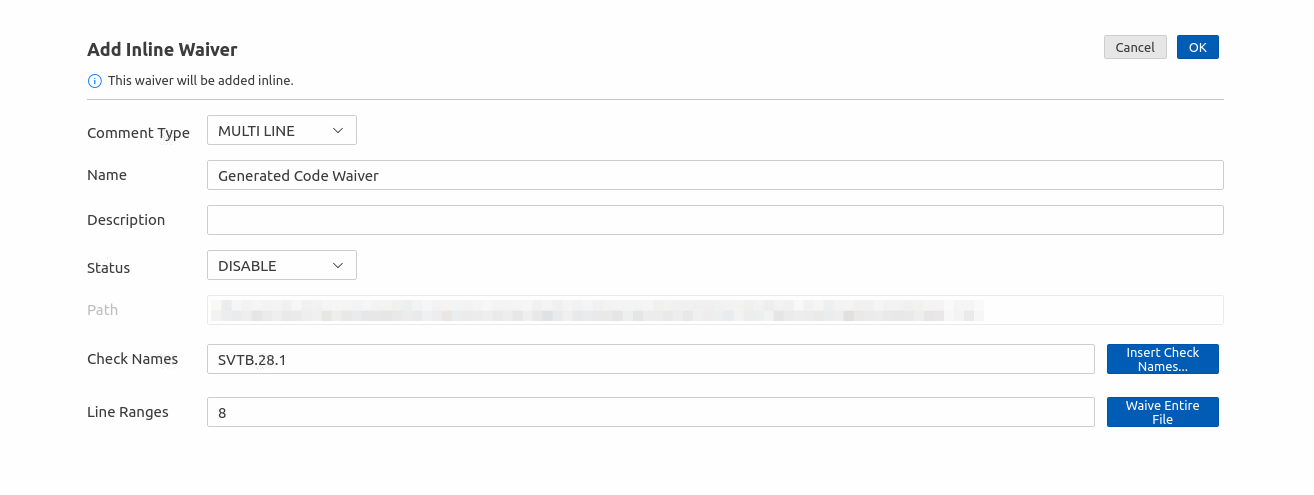
To create an inline waiver invoke the Quick Fix… command on an existing error and pick the Waive … error inline proposal. The parameters that can be configured are:
Comment type: the type of comment that will be inserted in code
Name: an unique name for the waiver
Description: a short explanation for the waiver
Status: the status that will be applied to the matched failures
Check Names: the name of the checks this waiver applies to, separated by comma
Insert Check Names button: opens a quickpick with checks available in current linting session; those selected will be added to the waiver
Line Ranges: the line, or line range (StartLine:EndLine) this waiver must match
Waive Entire File button: replaces the current line or line range with a line range covering the entire file